


magtek_cr_switch
Программа для ОС Linux которая переключает режимы работы MagTek Swipe Card Reader.
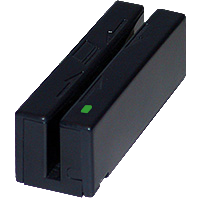
MagTek Swipe Card Reader
Компактное магнитное устройство считывания карт, которое соответствует стандартам ISO. Ридер является совместимым любым устройства совместимым с USB. Устройство поддерживает режимы: эмуляция клавиатуры и HID устройства.
Usb идентификаторы устройства
0801:0001 - режим эмуляции клавиатуры
0801:0002 - режим HID устройства
Установка в Ubuntu Linux
Подключите репозиторий:
Откройте System->Administration->Software Sources
Перейдите на вкладку Other Software, нажмите кнопку Add, в появившимся окне введите строку:
deb http://www.kaa.org.ua/ubuntu binary/ нажмите кнопку Add sources.
Далее откройте Терминал и наберите там: sudo apt-get install magtek_cr_switch
Примеры использования:
$ magtek_cr_switch
Mag-Tek Mini Swipe Reader in Keyboard mode detected.$ magtek_cr_switch
Mag-Tek Mini Swipe Reader in HID mode detected.$ magtek_cr_switch -s
Mag-Tek Mini Swipe Reader in HID mode detected.
Kernel driver is active.
Detaching a kernel driver from an interface 0x0 ... successfully
Switching to keyboard mode ... successfully
Reseting device ... successfully$ magtek_cr_switch -s
Mag-Tek Mini Swipe Reader in Keyboard mode detected.
Kernel driver is active.
Detaching a kernel driver from an interface 0x0 ... successfully
Switching to HID mode ... successfully
Reseting device ... successfully$ magtek_cr_switch -h
MagTek Card Reader mode switch tool
Copyright (c) 2010 Oleg Kravchenko
This program is free software; you can redistribute it and/or modify
it under the terms of the GNU General Public License version 2 as
published by the Free Software Foundation.
Usage: magtek_cr_switch [-h] [-s]
-h - show this help
-s - switch card reader mode